
Objective#
The APIs discussed below are in beta and are subject to change.
This post walks through how to use Microsoft Graph and PowerShell to understand whether Cloud PCs are currently in use or have recent user connection activity. For shared Cloud PCs, the connectivityResult property can provide a near real-time availability signal. For dedicated Cloud PCs, the getRealTimeRemoteConnectionStatus report is the best current sign-in signal, while connection history is still useful as a fallback and for understanding recent connection events.
Microsoft Graph#
Microsoft Graph has four endpoints that can help us understand the sign-in or connection status of a Cloud PC:
/deviceManagement/virtualEndpoint/cloudPCs/deviceManagement/virtualEndpoint/cloudPCs/{ID}/getCloudPcConnectivityHistory/deviceManagement/virtualEndpoint/reports/getRealTimeRemoteConnectionStatus(cloudPcId='{ID}')/deviceManagement/virtualEndpoint/reports/getFrontlineReport
The cloudPCs endpoint#
Microsoft Graph includes the /deviceManagement/virtualEndpoint/cloudPCs endpoint in the beta API, which we can use to list Cloud PCs in our tenant and gather rich endpoint details. The API gives us the following response:
{
    "id": "941faead-a5db-44ba-aed6-f5c06cea0d18",
    "displayName": "",
    "imageDisplayName": "customw365",
    "provisioningPolicyId": "8e8a545f-6168-4472-9466-9f05520a5eb3",
    "provisioningPolicyName": "W365-Flex-Shared",
    "onPremisesConnectionName": "",
    "servicePlanId": "dd3801e2-4aa1-4b16-a44b-243e55497584",
    "servicePlanName": "Cloud PC Frontline 4vCPU/16GB/128GB",
    "status": "provisioned",
    "userPrincipalName": null,
    "lastModifiedDateTime": "2026-05-17T16:00:08.5878348Z",
    "managedDeviceId": "61f18b2b-8d04-44b4-bed0-1cb813d09a03",
    "managedDeviceName": "CFS-AVVP50J64LL",
    "aadDeviceId": "ba37f1d1-e7af-4bd5-8d82-67e1ea6b6c07",
    "gracePeriodEndDateTime": null,
    "servicePlanType": "enterprise",
    "diskEncryptionState": "encryptedUsingPlatformManagedKey",
    "provisioningType": "sharedByEntraGroup",
    "statusDetails": null,
    "statusDetail": null,
    "partnerAgentInstallResults": []
}
Using this endpoint we can have it return the connectivityResult properties using the $select parameter. Because inUse and underServiceMaintenance are evolvable enum values, include the Prefer: include-unknown-enum-members request header. The updatedDateTime property is deprecated, so use lastModifiedDateTime when you need the time the connectivity status last changed.
Prefer: include-unknown-enum-members

https://graph.microsoft.com/beta/deviceManagement/virtualEndpoint/cloudPCs?$select=id,displayName,managedDeviceName,provisioningType,userPrincipalName,status,aadDeviceId,connectivityResult
Which will give us the following response that includes the connectivityResult properties:
[
    {
        "id": "198294a2-4d1d-4c28-bb81-74c3f495a9b2",
        "displayName": "",
        "status": "provisioned",
        "userPrincipalName": null,
        "managedDeviceName": "CFS-23GSZS0XKJP",
        "aadDeviceId": "be7ff878-0c9e-4b76-8213-63108f4b5de8",
        "provisioningType": "sharedByEntraGroup",
        "connectivityResult": {
            "status": "inUse",
            "updatedDateTime": "0001-01-01T00:00:00Z",
            "lastModifiedDateTime": "2026-06-17T19:21:24.4858865Z",
            "failedHealthCheckItems": []
        }
    },
    {
        "id": "4a868f5f-dc0d-4d0f-91ac-54aa62a548b2",
        "displayName": "W365-Flex-Dedicated - Vance DeLeon",
        "status": "provisioned",
        "userPrincipalName": "VanceD@M365CPI91293196.OnMicrosoft.com",
        "managedDeviceName": "CFD-Vance-XS4KT",
        "aadDeviceId": "308415a9-8a30-43a3-a98a-a20684a8bbd8",
        "provisioningType": "sharedByUser",
        "connectivityResult": null
    }
]
If you have a mix of dedicated Cloud PCs and shared Cloud PCs, you may notice that only shared Cloud PCs have values that are not null in the connectivityResult property. For shared Cloud PCs, connectivityResult is useful as a near real-time availability signal because Windows 365 Flex Shared mode has a pool lifecycle to track: available, in use, and under service maintenance after sign-out. Dedicated Cloud PCs do not participate in that shared-pool lifecycle, so connectivityResult may be null and should not be treated as a live sign-in signal for those devices.
If I log out of a shared Cloud PC and quickly query the machine in Microsoft Graph, I can see that it moves to a status of underServiceMaintenance before being put back in an available status. The servicing status represents service-initiated maintenance for the Cloud PC, which is described here.
{
    "id": "198294a2-4d1d-4c28-bb81-74c3f495a9b2",
    "displayName": "",
    "status": "provisioned",
    "userPrincipalName": null,
    "managedDeviceName": "CFS-23GSZS0XKJP",
    "aadDeviceId": "be7ff878-0c9e-4b76-8213-63108f4b5de8",
    "provisioningType": "sharedByEntraGroup",
    "connectivityResult": {
        "status": "underServiceMaintenance",
        "updatedDateTime": "0001-01-01T00:00:00Z",
        "lastModifiedDateTime": "2026-06-17T19:30:11.7890139Z",
        "failedHealthCheckItems": []
    }
}
To get the current sign-in status of a Cloud PC, including dedicated Cloud PCs where connectivityResult is null, use the getRealTimeRemoteConnectionStatus report endpoint. If you need historical connection events instead of current status, use getCloudPcConnectivityHistory. You can read more about the cloudPcConnectivityResult resource type on Microsoft Learn.
The reports/getRealTimeRemoteConnectionStatus endpoint#
The getRealTimeRemoteConnectionStatus endpoint returns sign-in status for a specific Cloud PC. Unlike querying connectivityResult from the cloudPCs endpoint, this works for a Cloud PC by ID and can return SignInStatus, DaysSinceLastSignIn, and LastActiveTime.
This endpoint can still lag by several minutes in my testing. I treat it as the best current sign-in API signal for dedicated Cloud PCs, not as a guaranteed instantaneous signal.
This endpoint requires the CloudPC.Read.All permission for delegated or application access.
https://graph.microsoft.com/beta/deviceManagement/virtualEndpoint/reports/getRealTimeRemoteConnectionStatus(cloudPcId='f55ba1ae-4d31-4b41-a19f-5ca6fd5d8ffe')It returns a JSON report payload that includes a schema and values array:
{
    "TotalRowCount": 1,
    "Schema": [
        {
            "Column": "ManagedDeviceName",
            "PropertyType": "String"
        },
        {
            "Column": "CloudPcId",
            "PropertyType": "String"
        },
        {
            "Column": "DaysSinceLastSignIn",
            "PropertyType": "Int64"
        },
        {
            "Column": "SignInStatus",
            "PropertyType": "String"
        },
        {
            "Column": "LastActiveTime",
            "PropertyType": "DateTime"
        }
    ],
    "Values": [
        [
            "CPC-brad-U2O0S",
            "f55ba1ae-4d31-4b41-a19f-5ca6fd5d8ffe",
            0,
            "NotSignedIn",
            "2026-06-19T05:20:28"
        ]
    ]
}
Because this endpoint takes a single cloudPcId, returning this status for every Cloud PC requires listing Cloud PCs first and then calling getRealTimeRemoteConnectionStatus once per Cloud PC. The Get-CloudPCReport -ReportName realTimeRemoteConnectionStatus function handles that loop for you, and includes retry handling for Graph throttling responses.
The getCloudPcConnectivityHistory endpoint#
The getCloudPcConnectivityHistory endpoint returns the connectivity history for a specified Cloud PC (dedicated and shared). It is useful for seeing connection events such as Connection Started and Connection Finished. If the real-time report is unavailable, you can infer whether a dedicated Cloud PC is still in use by checking whether the latest successful Connection Started event has a later terminal event, such as Connection Finished or a failure.
This endpoint appears to not be instantaneous and instead can be delayed by about five minutes in my testing.
When looking up the connectivity history of a Cloud PC I am returned the following:
[
    {
        "activityId": "362deb91-d2ec-4e66-9d8a-d8708c440000",
        "eventDateTime": "2026-06-17T19:21:00Z",
        "eventType": "userConnection",
        "eventName": "Connection Started",
        "eventResult": "success",
        "message": ""
    },
    {
        "activityId": "362deb91-d2ec-4e66-9d8a-d8708c440000",
        "eventDateTime": "2026-06-17T19:29:54Z",
        "eventType": "userConnection",
        "eventName": "Connection Finished",
        "eventResult": "success",
        "message": ""
    }
]
The reports/getFrontlineReport endpoint#
The last endpoint allows IT administrators to get different reports including one called frontlineLicenseUsageRealTimeReport that will tell us the total licenses for a pool and how many are claimed. There are a couple of things to keep in mind with this endpoint:
- It returns a JSON report payload
- It uses the
POSTmethod - You must specify the report you want in the body of the call. You can get a list of the reports here
- In my testing, it is not as quick as the
cloudPCsendpoint. I would estimate it was delayed around 60-90 seconds.
To get the frontlineLicenseUsageRealTimeReport you will need to make a POST to https://graph.microsoft.com/beta/deviceManagement/virtualEndpoint/reports/getFrontlineReport. In the body you can define the report you want:
{
  "reportName": "frontlineLicenseUsageRealTimeReport"
}
It will return a JSON file that you will need to parse:
{
   "TotalRowCount":2,
   "Schema":[
      {
         "Column":"ServicePlanId",
         "PropertyType":"String"
      },
      {
         "Column":"DeviceName",
         "PropertyType":"String"
      },
      {
         "Column":"LicenseCount",
         "PropertyType":"Int32"
      },
      {
         "Column":"ClaimedLicenseCount",
         "PropertyType":"Int32"
      },
      {
         "Column":"ConcurrentAccessGroupId",
         "PropertyType":"String"
      },
      {
         "Column":"DateTimeUTC",
         "PropertyType":"DateTime"
      },
      {
         "Column":"AllotmentName",
         "PropertyType":"String"
      },
      {
         "Column":"ConfigId",
         "PropertyType":"String"
      },
      {
         "Column":"TargetId",
         "PropertyType":"String"
      },
      {
         "Column":"LicenseStatus",
         "PropertyType":"Int64"
      },
      {
         "Column":"AllConnectedCount",
         "PropertyType":"Int64"
      },
      {
         "Column":"SkuLicenseCount",
         "PropertyType":"Int32"
      }
   ],
   "Values":[
      [
         "dd3801e2-4aa1-4b16-a44b-243e55497584",
         "Unalloted",
         3,
         0,
         "00000000-0000-0000-0000-000000000000",
         "2026-06-18T18:28:43",
         "",
         "",
         "",
         1,
         0,
         5
      ],
      [
         "dd3801e2-4aa1-4b16-a44b-243e55497584",
         "CPC-Shared-1",
         2,
         0,
         "3f2ba867-dfd3-4459-a4ce-7d05a2b83332",
         "2026-06-19T14:55:24",
         "CPC-Shared-1",
         "8e8a545f-6168-4472-9466-9f05520a5eb3",
         "3c21cf2b-8b30-460a-9741-1c7377b2f2bf",
         1,
         null,
         null
      ]
   ]
}
WindowsCloudPC PowerShell Module#
The WindowsCloudPC PowerShell module includes many different functions to easily interact with the Windows 365 service including Cloud PCs without having to have knowledge of REST API’s.
To get started, run the following command:
Install-Module -Name WindowsCloudPC -Scope CurrentUserOnce the module is installed you can connect to your tenant by running Connect-CloudPC.
Get-CloudPCUsage function#
The Get-CloudPCUsage function iterates through your Cloud PCs and returns the sign-in status of each one, including the last active time, days since each one was last signed into, and the signed-in user when available. It can report usage for every Cloud PC, or you can pass a Cloud PC object, exact Cloud PC ID, or exact Cloud PC name to -CloudPC.
To get the Cloud PC usage details you can run Get-CloudPCUsage.
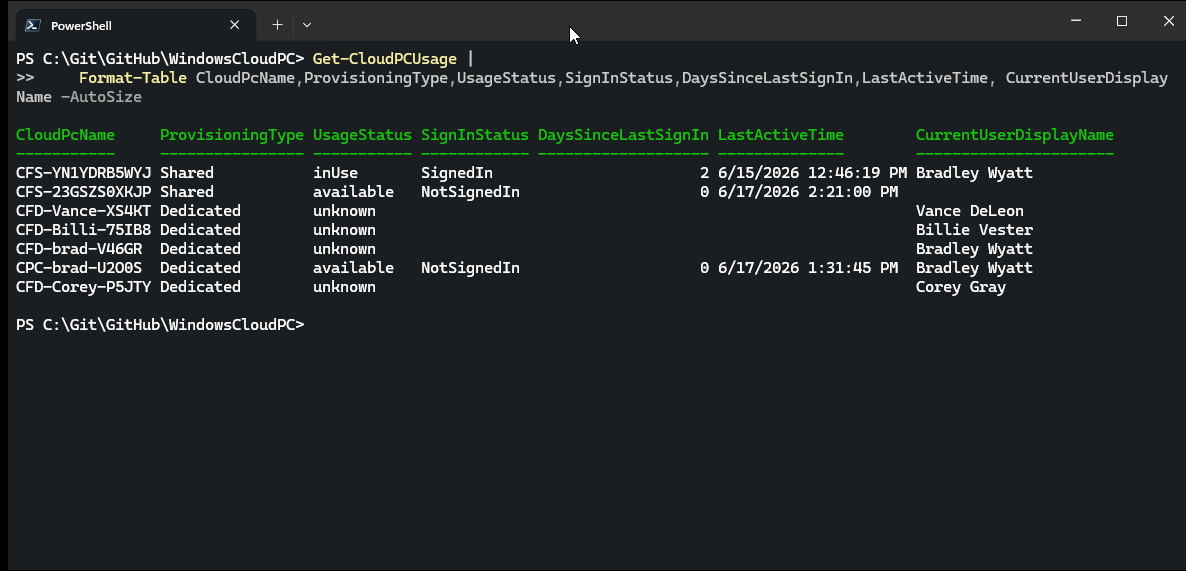
How Get-CloudPCUsage weights the endpoints#
Get-CloudPCUsage does not treat every endpoint as equal. It weights the signal differently depending on whether the Cloud PC is shared or dedicated:
| Cloud PC type | Weight | Endpoint | How it is used |
|---|---|---|---|
| Shared | 1 | /deviceManagement/virtualEndpoint/cloudPCs?$select=...,connectivityResult | Primary source for UsageStatus and SignInStatus. inUse maps to signed in, available maps to not signed in, and other service states such as underServiceMaintenance are preserved. |
| Shared | 2 | /deviceManagement/virtualEndpoint/cloudPCs/{ID}/getCloudPcConnectivityHistory | Used to enrich LastActiveTime and DaysSinceLastSignIn; it does not override the shared Cloud PC connectivityResult status. |
| Dedicated | 1 | /deviceManagement/virtualEndpoint/reports/getRealTimeRemoteConnectionStatus(cloudPcId='{ID}') | Primary source for current sign-in state. SignedIn maps to UsageStatus = inUse; NotSignedIn maps to UsageStatus = available. |
| Dedicated | 2 | /deviceManagement/virtualEndpoint/cloudPCs/{ID}/getCloudPcConnectivityHistory | Fallback when the real-time report is unavailable. The latest successful Connection Started event with no later Connection Finished or failure maps to inUse; otherwise it maps to available. |
| Dedicated | 3 | /deviceManagement/virtualEndpoint/cloudPCs connectivityResult | Final fallback only, because dedicated Cloud PCs often have a null connectivityResult. |
The current user fields are enriched separately. Shared Cloud PCs use sharedDeviceDetail.assignedToUserPrincipalName; dedicated Cloud PCs use the matching Intune managed device and its usersLoggedOn data when available. Those user-enrichment fields do not override the endpoint weighting used for UsageStatus.
Get-CloudPCReport function#
The Get-CloudPCReport function allows you to export reports from Windows 365 including the frontlineLicenseUsageRealTimeReport and getRealTimeRemoteConnectionStatus. It will automatically parse the returned JSON file and display the results in a PowerShell friendly way. When running the function you must specify which report you want to run:
Get-CloudPCReport -ReportName frontlineLicenseUsageRealTimeReportWhich will return the following PowerShell objects:
ReportName              : frontlineLicenseUsageRealTimeReport
Action                  : getFrontlineReport
TotalRowCount           : 2
OutputFilePath          : C:\Users\bradleywyatt\AppData\Local\Temp\windowscloudpc-report-frontlineL
                          icenseUsageRealTimeReport-51a2bb19daf347ae921f09e61c1b25be.json
ServicePlanId           : dd3801e2-4aa1-4b16-a44b-243e55497584
DeviceName              : Unalloted
LicenseCount            : 3
ClaimedLicenseCount     : 0
ConcurrentAccessGroupId : 00000000-0000-0000-0000-000000000000
DateTimeUTC             : 6/18/2026 6:28:43 PM
AllotmentName           :
ConfigId                :
TargetId                :
LicenseStatus           : 1
AllConnectedCount       : 0
SkuLicenseCount         : 5
RawValues               : {dd3801e2-4aa1-4b16-a44b-243e55497584, Unalloted, 3, 0…}
Raw                     : {[TotalRowCount, 2], [Schema, System.Object[]], [Values,
                          System.Object[]]}

ReportName              : frontlineLicenseUsageRealTimeReport
Action                  : getFrontlineReport
TotalRowCount           : 2
OutputFilePath          : C:\Users\bradleywyatt\AppData\Local\Temp\windowscloudpc-report-frontlineL
                          icenseUsageRealTimeReport-51a2bb19daf347ae921f09e61c1b25be.json
ServicePlanId           : dd3801e2-4aa1-4b16-a44b-243e55497584
DeviceName              : CPC-Shared-1
LicenseCount            : 2
ClaimedLicenseCount     : 0
ConcurrentAccessGroupId : 3f2ba867-dfd3-4459-a4ce-7d05a2b83332
DateTimeUTC             : 6/19/2026 2:55:24 PM
AllotmentName           : CPC-Shared-1
ConfigId                : 8e8a545f-6168-4472-9466-9f05520a5eb3
TargetId                : 3c21cf2b-8b30-460a-9741-1c7377b2f2bf
LicenseStatus           : 1
AllConnectedCount       :
SkuLicenseCount         :
RawValues               : {dd3801e2-4aa1-4b16-a44b-243e55497584, CPC-Shared-1, 2, 0…}
Raw                     : {[TotalRowCount, 2], [Schema, System.Object[]], [Values,
                          System.Object[]]}
Get-CloudPCReport -ReportName realTimeRemoteConnectionStatusWhich will return the following PowerShell objects:
ReportName          : realTimeRemoteConnectionStatus
Action              : getRealTimeRemoteConnectionStatus
TotalRowCount       : 1
OutputFilePath      : C:\Users\bradleywyatt\AppData\Local\Temp\windowscloudpc-report-realTimeRemoteConnectionStatus-198
                      294a2-4d1d-4c28-bb81-74c3f495a9b2-ddeb8be87b074cd89b20561d90e9b42e.json
ManagedDeviceName   : CFS-23GSZS0XKJP
CloudPcId           : 198294a2-4d1d-4c28-bb81-74c3f495a9b2
DaysSinceLastSignIn : 0
SignInStatus        : NotSignedIn
LastActiveTime      : 6/19/2026 5:37:10 PM
RawValues           : {CFS-23GSZS0XKJP, 198294a2-4d1d-4c28-bb81-74c3f495a9b2, 0, NotSignedIn…}
Raw                 : {[TotalRowCount, 1], [Schema, System.Object[]], [Values, System.Object[]]}
Wrapping Up#
The connectivityResult property is a useful near real-time signal for shared Cloud PCs because it reflects the shared pool lifecycle. For current sign-in status by Cloud PC ID, use getRealTimeRemoteConnectionStatus. For connection history, use getCloudPcConnectivityHistory instead of relying on connectivityResult being populated.